
Create Compose Override Configuration
When creating Compose tasks using remote yaml or app store, sometimes you need to modify some parameters in compose.yaml, such as ports, mount directories, etc. If you modify the yaml directly, when the app author releases a new version, you need to manually merge these differences.
At this point, you can use the override yaml method to create a new yaml file that appends or overrides configurations to the original yaml file.
Create Override Configuration File
TIP
The override configuration file only needs to contain the configuration items you want to adjust.
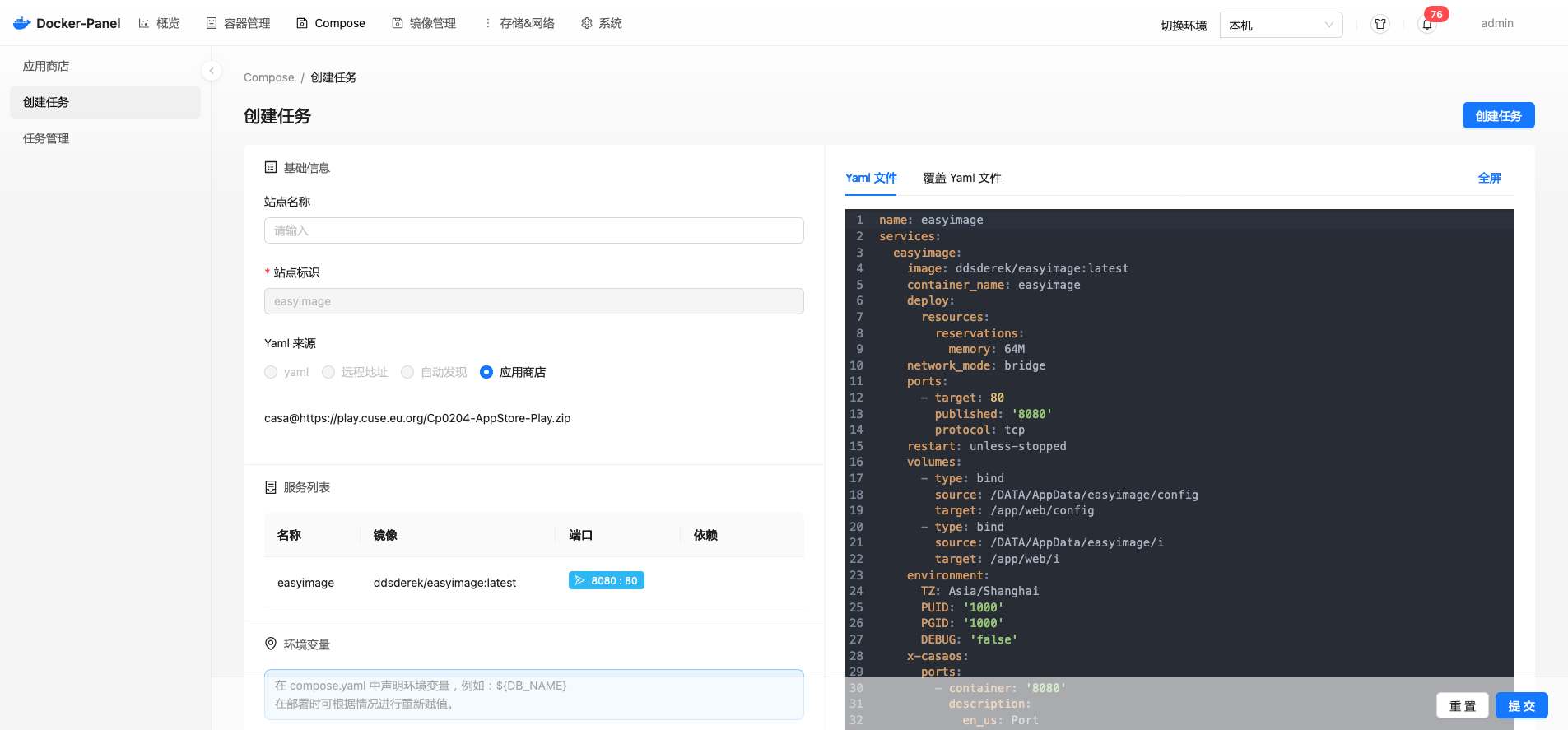
Override Configuration
Assuming the original yaml file content is:
name: easyimage
services:
  easyimage:
    image: ddsderek/easyimage:latest
    ports:
      - target: 80
        published: '8080'
        protocol: tcp
    restart: unless-stopped
    volumes:
      - type: bind
        source: /DATA/AppData/easyimage/config
        target: /app/web/config
      - type: bind
        source: /DATA/AppData/easyimage/i
        target: /app/web/i
    environment:
      TZ: Asia/Shanghai
      PUID: '1000'
      PGID: '1000'
DEBUG: 'false'Add Configuration
Add a new port mapping, configured to map both port 80 and 88 during deployment:
services:
  easyimage:
    ports:
- 8888:88Modify Configuration
Modify the mount directory, pointing one to the host directory and one to the storage volume:
services:
  easyimage:
    ports:
      - 8888:88
    volumes:
      - /home/easyimage/config:/app/web/config
      - easyimage_i:/app/web/i
volumes:
  easyimage_i:
name: easyimage_iForce Override Configuration
DANGER
Synology or older Docker versions do not support this configuration. If you need to override operations, you must directly modify the original file.
# This override configuration will eventually map to 8888, 9999, and 8080
services:
  easyimage:
    ports:
      - 8888:88
- 9999:80# Using the !override syntax, only 8888 and 9999 will eventually be mapped
services:
easyimage:
ports: !override
- 8888:88
- 9999:80Clear Configuration
Using the !reset syntax, you can clear the mapped port configuration and not expose any ports.
services:
  easyimage:
ports: !resetReplace Service in YAML with Existing Container
When deploying two wordpress projects with compose, multiple mysql databases will be generated. However, in practice, most approaches let multiple wordpress instances share the same mysql instance, distinguished by different databases.
In the yaml below, if you don't want to deploy the db service and let phpmyadmin manage the already existing localmysql, you can define the following override configuration. When deploying the compose task, uncheck the db service, and the panel will no longer deploy the db service.
TIP
Note that phpmyadmin in compose needs to be able to access localmysql, so you need to join them to the same network.
services:
  db:
    image: mysql:5.7
    volumes:
      - db_data:/var/lib/mysql
    restart: always
    ports:
      - :3306
    environment:
      MYSQL_ROOT_PASSWORD: ${PASSWORD}
      MYSQL_DATABASE: ${DATABASE}
      MYSQL_PASSWORD: "123456"
    networks:
      - mysql-phpmyadmin
  phpmyadmin:
    depends_on:
      - db
    image: phpmyadmin
    restart: always
    ports:
      - 8080:80
    environment:
      - PMA_HOST=db
      - MYSQL_ROOT_PASSWORD=password
    networks:
      - mysql-phpmyadmin
networks:
  mysql-phpmyadmin: null
volumes:
db_data: nullUse !reset to rewrite the dependency service, at this point phpmyadmin manages the external existing localmysql container
services:
  phpmyadmin:
    depends_on: !reset
    external_links:
      - localmysql:db